How to Build a Consistent Visual Brand Across Social Media Using AI
May 26, 2026 • ArchyPress
Your brand is not what you say it is. It's what your audience sees — in the first 0.4 seconds of scrolling past your post.
When every social platform demands a different format, resolution, and aspect ratio, keeping your visual identity consistent becomes a full-time job. AI is changing that equation.
The Visual Consistency Problem No One Talks About
Here's a scenario every marketer knows too well: you create a stunning visual for LinkedIn, then need to adapt it for Instagram Stories, X posts, Facebook covers, and TikTok. By the third resize, your brand's visual DNA has mutated beyond recognition.
Research from Lucidpress shows that consistent brand presentation across platforms increases revenue by up to 23%. Yet most marketing teams struggle to maintain visual coherence across just three platforms — let alone seven.
The root cause isn't laziness or lack of talent. It's a structural problem: each platform has different optimal dimensions, content expectations, and algorithmic preferences. What works as a 1200×627 LinkedIn image looks terrible cropped to a 1080×1080 Instagram square.
Why Traditional Workflows Break Down
Format fragmentation: LinkedIn (1200×627), Instagram (1080×1350), X (1600×900), Stories (1080×1920) — one design doesn't fit all
Time pressure: Most teams produce 15–30 posts per week across multiple networks, leaving no time for bespoke visual adaptation
Tool sprawl: Designers use Figma, marketers use Canva, AI tools generate in yet another format — consistency gets lost in translation
Provider lock-in: Relying on a single AI model means accepting its aesthetic limitations for every piece of content
Version drift: Without centralized brand settings, each batch of content drifts slightly from the original guidelines
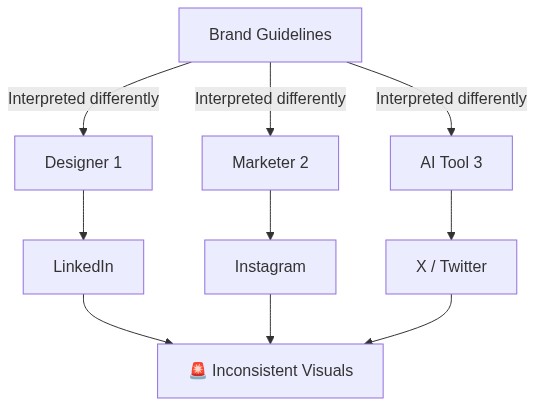
The diagram above illustrates the classic fragmentation pattern. Even with a brand guide, every person and tool in the chain introduces their own interpretation. The result? Your audience sees a different brand on every platform.
The Multi-Provider AI Approach: A New Paradigm
The solution isn't to abandon AI image generation — it's to orchestrate multiple providers under a unified brand layer. Think of it as giving every AI model the same creative brief, brand constraints, and quality standards before it generates a single pixel.
Single-Provider Problem
One AI model has aesthetic biases. Gemini excels at photorealism, DALL-E at illustration, Runway at cinematic motion. Using just one limits your visual vocabulary.
Multi-Provider Solution
Route each generation request to the best provider for the task — photorealistic hero images, stylized social tiles, cinematic video loops — all governed by your brand settings.
Brand-Constrained Output
Every provider receives your brand colors, logo placement rules, composition preferences, and visual instructions. The output is yours, not the model's default.
How It Works: The Brand-First AI Generation Pipeline
A modern AI visual generation workflow puts brand settings at the center, not as an afterthought. Here's how the pipeline flows from brief to published post:
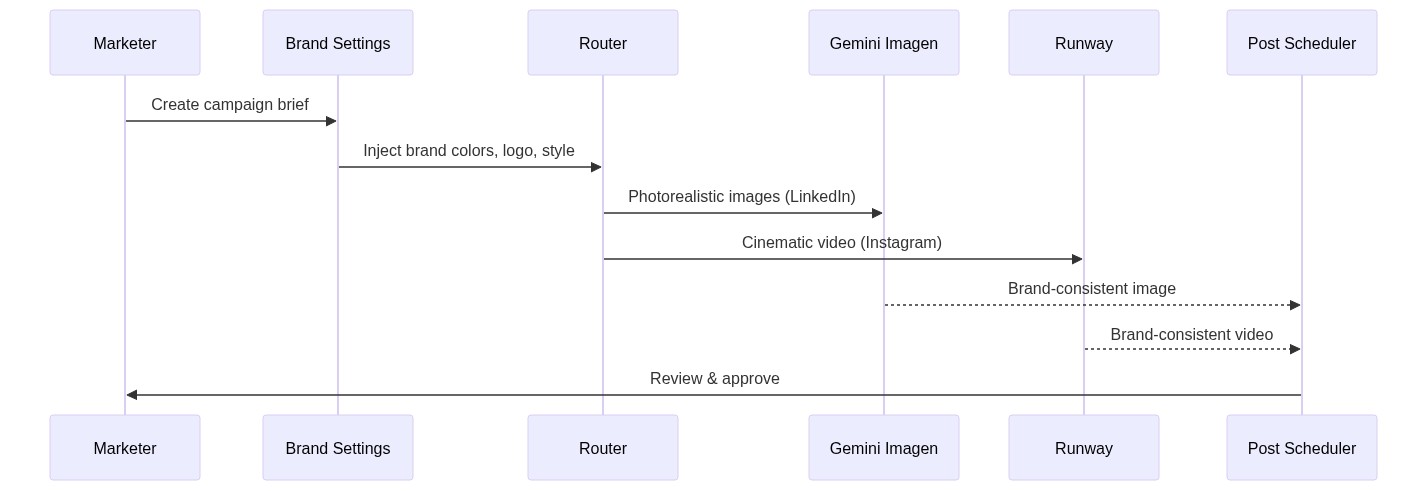
Best Practice #1: Define Your Visual DNA Before Generating
Before you generate a single image, establish these brand-level settings that every AI provider will respect:
Logo placement rules — position (bottom-right, top-left, center) and opacity (0.6–1.0) for watermark overlays
Color palette constraints — primary, secondary, and accent colors that the AI should favor in compositions
Composition instructions — "no text overlays", "dark moody backgrounds", "minimal and clean" — whatever defines your aesthetic
Provider preferences per content type — photorealistic for LinkedIn thought leadership, stylized for Instagram engagement, cinematic for video stories
Aspect ratio mapping — which networks get which dimensions, pre-configured so every generation is platform-optimized
The key insight: these settings are defined once and applied to every generation automatically. No manual intervention needed per post.
Best Practice #2: Match Providers to Content Types
Not all AI image generators are created equal. Each has strengths that map to specific content needs:
Photorealistic Product & People
Use Gemini Imagen or DALL-E for professional headshots, product photography, and documentary-style images. Ideal for LinkedIn and corporate content.
Cinematic Video Loops
Use Runway, Kling, or Wan for atmospheric 10–12 second loops. Perfect for Instagram Reels, TikTok, and attention-grabbing story content.
Stylized Editorial Illustrations
Use vector or claymation styles for explanatory content, infographics, and how-to posts. Great for blog features and carousel content.
Brand-Safe Compositions
Configure composition suffixes like 'no text overlay, no watermark, dark background' to keep outputs within brand guidelines regardless of provider.
Best Practice #3: Automate the Feedback Loop
The most effective visual brand systems create a virtuous cycle: generate, publish, measure, improve. Track which visual styles and providers drive the highest engagement per network, then feed those insights back into your brand settings.

The Economics: Why Multi-Provider Beats Single-Provider
Beyond visual quality, there's a compelling business case for the multi-provider approach:
Cost optimization: Route low-stakes content to affordable providers, reserve premium credits for hero content
Redundancy: If one provider has an outage or quality regression, others pick up the slack automatically
Style diversity: Different providers prevent 'AI sameness' — your feed looks varied while staying on-brand
Future-proofing: New models emerge monthly. A provider-agnostic architecture lets you adopt them instantly without reworking your entire pipeline
A/B testing: Run the same brief through multiple providers and let engagement data choose the winner
Real-World Implementation: From Theory to Practice
Here's what the workflow looks like in practice for a marketing team producing 20+ posts per week across 5 networks:
Set up brand settings once: upload logo, define position/opacity, specify preferred providers for image vs. video, write visual instructions
Create a campaign brief: describe your message, select target networks, let the system handle format adaptation
Generate visuals: the platform routes each network's image to the optimal provider with your brand constraints pre-injected
Review and approve: every generated asset appears in a unified dashboard with provider attribution — you see exactly which AI made what
Schedule and publish: bulk-schedule across all networks at optimal posting times per timezone
Track attribution: post-publish analytics show which provider/style combination drives the best results
Common Mistakes to Avoid
❌ Over-specifying prompts
Don't describe every pixel. Let the AI interpret your brand guidelines creatively. Over-constrained prompts produce stiff, lifeless images.
❌ Ignoring platform context
A LinkedIn audience expects polished professionalism. Instagram expects visual drama. X expects punchy simplicity. One visual doesn't fit all.
❌ Skipping the logo layer
Subtle brand watermarking (0.6–0.8 opacity, corner placement) builds recognition without feeling pushy. It's free brand reinforcement on every post.
❌ Set-and-forget brand settings
Review your provider preferences quarterly. AI models improve monthly — last quarter's underperformer might be today's best option.
The Bigger Picture: AI as Brand Guardian
The most interesting shift isn't about image quality — it's about control. When brand settings are defined as structured data (not a PDF that nobody reads), they become enforceable. Every generation request passes through the same brand layer. Every output inherits the same visual DNA.
This transforms AI from a 'wild card' content generator into a brand guardian — one that never forgets your guidelines, never gets tired of applying them, and scales to any volume of content without quality degradation.
For teams managing multiple social accounts across global markets, this isn't just convenient — it's the difference between a recognizable brand and visual noise.

Getting Started: Your 15-Minute Brand Setup
Upload your logo (PNG, JPEG, or WebP — keep it under 5 MB for fast loading)
Set your preferred logo position and opacity for generated visuals
Choose your default image provider (start with auto-routing and refine after seeing results)
Choose your default video provider (cinematic loops work beautifully for social)
Write 2–3 sentences of visual instructions that capture your brand's aesthetic
Generate your first campaign and compare outputs across providers
The best brand systems aren't rigid templates — they're intelligent constraints that give AI enough freedom to be creative while keeping every output unmistakably yours.
Ready to unify your visual brand across every platform?
Archy Social's multi-provider AI generation lets you set brand guidelines once and generate consistent, platform-optimized visuals automatically. No design team required.